|
HOUR-GLASS |
|
|
This project is a
"knock-off" of a Toothbrush Timer project.
Here is the original circuit:

The circuit is quite complex, so I decided to simplify it
by using a single 8-pin micro and a few surrounding components.
You will see the circuit in a moment, but first here is an introduction
to driving lots of LEDs with very few outputs.
This project drives
a number of LEDs via a very clever circuit.
There are 3 ways to dive a LED from an output of a micro.
The simplest is called "dump."
This is where the LED is connected directly to the output via a resistor
and when the output is HIGH, the LED illuminates. But if the micro has 5
outputs, only 5 LEDs can be illuminated.
A LED will only illuminate when the voltage is applied in the right
direction.
We can take advantage of this and connect 2 LEDs across each other with
one LED in the opposite direction.
When voltage is applied, one LED will illuminate and when the voltage is
reversed, the other LED will illuminate. This will allow us to
illuminate more than 5 LEDs.
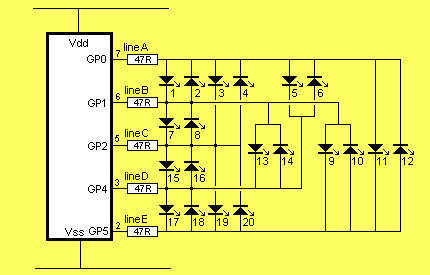
But if the LED-pairs are connected to the outputs as shown in the
diagram below, up to 20 LEDs can be driven from 5 lines. However only 2
LEDs can be on at any one time and these LEDs produce full brightness.
If you turn on the wrong set of output lines, more LEDs will illuminate
but the 25mA capability of each line will be shared between the LEDs.
Since only two LEDs can be on at the same time, the duty cycle is 10%.
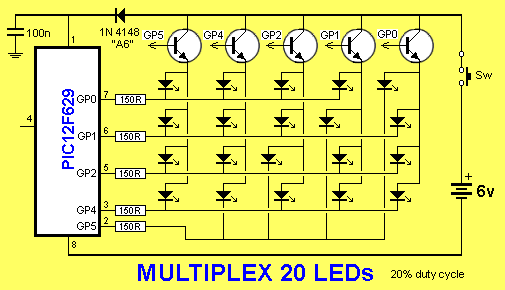
Another way to drive 20 LEDs is via MULTIPLEXING.
This is the same as SCANNING.
To turn on LEDs 1, 2, 3, 4 the drive lines are made LOW and the
fifth line is taken to a transistor. When the fifth line is taken HIGH,
the transistor supplies rail voltage to the 4 LEDs and they illuminate.
They are then turned off and 4 outputs drive LEDs 5, 6, 7, 8. The fifth
output (GP4) drives the transistor.
In this way up to 4 LEDs are turned on at a time and each LED gets a 20% duty
cycle.
The result is a display that is brighter than Charlieplexing.
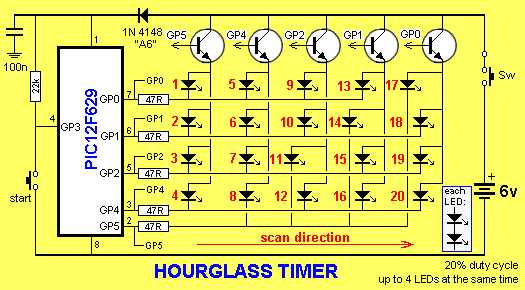
THE PROJECT
We also use the 30 instructions supplied with the chip to produce the program. This all works out to be the simplest and cheapest way to develop a microcontroller project as you only need a programmer to "burn" the program into the chip.
The programmer can be as simple as a 12 parts programmer or one that connects to the USB port of your computer.
The programmers are fully detailed on Talking Electronics website.
In this project we use an 8-pin micro to control 20 LEDs. These LEDs are in pairs and the result is a screen of 40 LEDs.
Driving LEDs takes an understanding of MULTIPLEXING. And you also need to understand the way the output port works.
This knowledge will help you develop similar projects and show how two or more outputs can be configured to control many devices.
THE RASTER You can see the 20 LEDs are very similar to the pixels on a TV screen.
We can only turn on the first column of 4 LEDs at the same time then the second column, third column, fourth column and finally the fifth column.
We can only turn on the first column of 4 LEDs at the same time then the
second column, third column, fourth column and finally the fifth column.
If we do this very quickly, all the LEDs will appear to be illuminated
at the same time. This is called scanning and we call this effect a
RASTER - taken from the scanning of an old-style TV.
This is due to Persistence Of Vision (of our eyes) and the fact
the LEDs can be turned on and off very quickly.
The 20 LEDs are distributed over the face of the project to create an
hourglass and a SCAN ROUTINE is written to access 4 LEDs at a time.
All we have to do is identify any of the LEDs in a column and those LEDS
will be turned on. We do this for the 5 columns and the whole screen is
accessed.
If no LEDs are identified, the screen is blank.
This is called the SCAN ROUTINE.
To prevent any flickering, the screen is scanned 100 times per second
and after each 25 scans, the program asks if the same LEDs are to be
illuminated. By turning LEDs on and off we produce flashing.
Everything is now ready to produce a table and each value in the table
sets the 4 LEDs either ON or OFF.
Each 5 values allows the screen to be displayed. This is called a
"frame."
The table can produce 255/5 = 51 "frames."
The Main routine inserts the 5 values into the SCAN sub-routine and
displays the frame for 1/5th second.
This project is similar to producing a cartoon. A cartoon consists of
FRAMES and when they are presented in quick succession, you get
movement.
This project consists of 51 frames, with each frame lasting 5 seconds,
creating a total of just over 4 minutes.
Each frame requires 5 bytes (for the 5 columns) from the table.
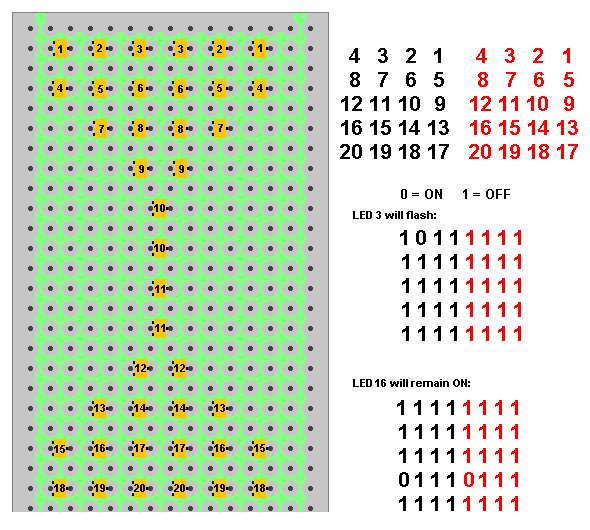
To produce a flashing effect we need to turn one or more the LEDs on and
off. To do this we used the upper nibble of each byte to correspond to
the 4 LEDs and outputted this data to the screen for 10mS. The next
upper nibble is used for the next 4 LEDs. The screen is scanned 25 times,
making a total of 10 x 25 = 250mS.
Now the lower nibble is used and the screen scanned 5 times. Any bits
that are not turned on will result in a flashing LED.
We are now up to 500mS or 1/2 second and routine is repeated 10 times to
get 5 seconds.
The program picks up the next 5 bytes of the table and repeats the
loops.
This is how flashing and movement is created on the screen.
At the end of 51 x 5 seconds (4.25 minutes), the piezo produces a tune
to indicate the end of the program.
The following diagram shows the position of each LED on the PC board and the 5 bytes
of the table. Two LEDs are connected in series and are referred to as a
single number to simplify the circuit.
THE PROGRAM
Only one column at a time can be displayed due to the small number of output pins on the microcontroller and this is called SCANNING THE DISPLAY.
This must be done very quickly and repeated a number of times so the display appears to be fully illuminated without any flicker. LEDs are then tuned ON and OFF to produce a flashing effect.
The program then advances to the next 5 bytes and repeats. This is done 51 times.
The program would be very simple except for two things.
The data from the table cannot be fed directly to the output lines because the output bits do not match-up directly with the 4 bits from the table. The table bits are 0, 1 , 2 and 3. Whereas the output bits are 0, 1, 2, 4, and 5, with one of the bits to turn on the column-transistor. This means one or two of the bits has to be moved sideways and the transistor bits has to be an output and "set" to create a HIGH.
But it is the next requirement that takes skill to produce the code.
Any of the lines that are not being used must be converted to an INPUT.
This converts them into a high impedance line so they are neither high or low. It is not until you study the circuit very thoroughly that you see why this is necessary.
Unwanted LEDs can be turned on during the scan via the base-emitter junction of a transistor. To prevent this we make all lines INPUTS and only create outputs on the lines we need. You will notice the data from the table consists of "1's" for an unlit LED and this corresponds to an INPUT for the tris register. That's why we can directly feed the tris register with the table data. Any "0" bits in the table data create an output. All "1's" create an input.
The only bit that has to be zero is the transistor bit, to create an output.
Once the tris data is created, the only alteration is "1" for the transistor bit to create a HIGH and the data can be sent to the output port (GPIO port).
Build the circuit so the transistors and LEDs are in exactly the same places as the symbols on the circuit diagram.
This is very important as the display will be "scanned." In other words each column will be turned on for a short period of time and then the next column will be turned on.
If you do this fast enough, all the LEDs will appear to be turned on at the same time.
There is a reason why we have to scan the display.
Although each LED can be turned on and off individually, we cannot turn on some combinations of LEDs without turning on other LEDs that have the same lines that feed them. For example, we cannot turn on LEDs 1,4,5,8 at the same time, because to turn on LED4 GP5 has to be LOW and to turn on LED5 GP4 has to be HIGH. Rather than deal with all these conflicts, we scan the columns.
To show this feature, the first program you should burn into the chip is the "Column Test" routine:
Here are the files:
ColumnTest.asm
ColumnTest.hex
ATTRACT MODE
When a gaming machine or video game is waiting for a customer, it displays a sequence to encourage a new player. This is called the ATTRACT MODE and we have a starting sequence in this project to show the circuit is working. We call it the Attract Mode.
GOING FURTHER
This project provides the opportunity to produce your own screen-effects. All you have to do is create your own "cells" of illuminated LEDs and select the time for each cell to appear on the screen.
Each cell consists of 5 bytes with the upper nibble of each byes displayed first. This means each 5 bytes will produce two cells.
You can loop these two cells any number of times or increment down the table after one loop.
You are limited to 50 x 2 cells.
;*******************************************
;WORLDS SIMPLEST PROGRAM             *
;  18-5-2010                         *
;                                    *
;**********************************	list	p=12F629
	radix	dec
	include	"p12f629.inc"

	__CONFIG  _MCLRE_OFF & _CP_OFF &
                _WDT_ON & _INTRC_OSC_NOCLKOUT  ;Internal osc.

;************************************
;Beginning of program
;************************************
	org	0x00
	bsf	status, rp0 	;bank 1
	bcf	TRISIO,4	;GP4 output
	movlw   b'00001011' ;bit3=1=WDT  011=/8 WDT=18mSx8=0.144Sec
        movwf   option_reg     	;must be in bank 1
        bcf	status, rp0	;bank 0
        movlw	b'00010000'	;to toggle GP4
	xorwf	GPIO,f
	sleep	sleep

	END
|
19/3/2013